Our biggest automated test suite used to take most of a working day to run, but now it finishes in under 40 minutes. Here’s how I sped it up without using Cypress Cloud or moving to Playwright.
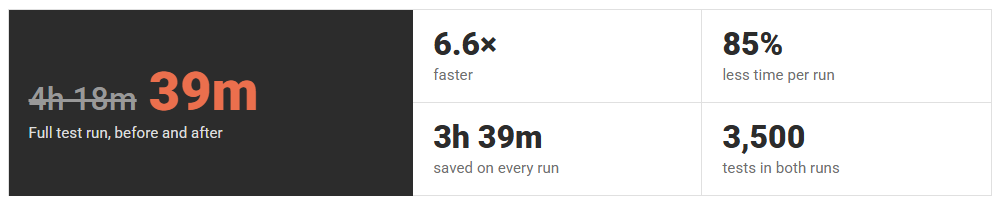
Before we do a production release we run our automated test suite. For one particular client we have 3,500 tests, which for the last release this took 6 hours 30 minutes! Although on average it takes about four to four and a half hours. So I set off on a mission to reduce this time, without spending a load of time porting the tests to Playwright, which is what all the cool kids would probably do.
The tests are written in Cypress, using Cucumber feature files so they read like plain English. They run from TeamCity against a test server and cover two sites, the main website Site A and a sister Site B that share a similar platform.
One Test After Another
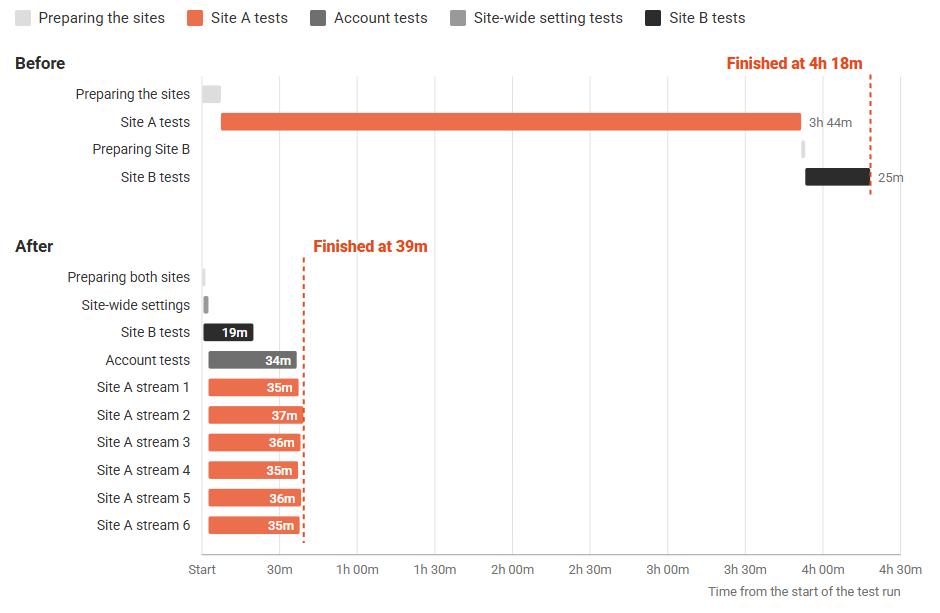
The old setup was about as simple as it gets. TeamCity ran a single cypress run, which worked through every feature file one after another. The main site's tests took 3 hours 44 minutes on their own, and the sister site's tests had to wait until they had finished before they could start.
Most of a test's time is spent waiting for pages to load, so one browser on its own leaves the build agent with very little to do. The obvious answer was to run several at once.
Running in Parallel Without Cypress Cloud
Cypress Cloud can split tests across machines for you, but I wanted to keep everything on our own build agent. Instead I used cypress-split, a plugin that splits the spec files between several Cypress processes. You tell each process how many there are and which one it is, and it picks its share of the files. If you give it a file of previous timings, it balances the work by duration rather than just by the number of files.
On top of that I wrote a small Node script that starts several cypress run processes on the same agent and waits for them all to finish. That sounds simple, and mostly it is, but there were a few things to sort out first. Each process needed its own folder for its compiled test bundle, otherwise they overwrote each other's files halfway through a run. Each one also needed its own folder for its test reports, which are merged at the end. And because TeamCity reads messages from the build output to report on each test, the output from the different processes couldn't be allowed to mix part way through a line.
Not All Tests Play Nicely Together
The biggest problem with running tests in parallel is that some of them don't expect anyone else to be on the site at the same time. A handful change settings for the whole site, such as turning on a site-wide banner, which would break any test that happened to be looking at the page. Others share test customer accounts and change their addresses, orders, or passwords.
I tagged these tests so the script could treat them differently. Anything tagged @GlobalState runs first on its own. Anything tagged @SharedAccountData runs in its own lane, one test after another, alongside everything else. The rest of the tests are shared out between the parallel lanes. The sister site runs in a lane of its own at the same time, as it doesn't share any of this state with the main site.
Balancing the Lanes
With six lanes, the run is only as fast as the slowest lane, so the work has to be spread evenly. After every run the script saves how long each feature file took, and TeamCity publishes that as a build artifact. I commit it back into the repository, and the next run uses it to balance the lanes.
cypress-split can only share out whole files, so one huge feature file sets the minimum time for a run. There were a few feature files that stood out as having a lot of tests in, so I split them into smaller files. Once I had done that, all six lanes finished within two minutes of each other.
Finding the Sweet Spot
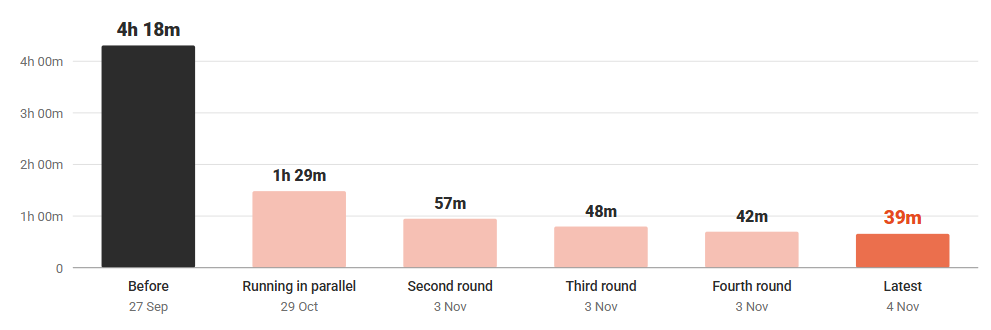
I started with four lanes, then tried five, then six. Each step took a few more minutes off, but by six the test server was starting to slow down, and pages were taking around 7.5% longer to load. The build agent's CPU was only at about 30%, so the limit was now the site rather than the machine running the tests. Six felt like the right number for now.
I also found a few smaller wins. Every page was loading Google Tag Manager and a long list of marketing scripts, none of which the tests cover, so I told Cypress to block them.
export default defineConfig({
  e2e: {
    baseUrl: "https://example/com",
    specPattern: "**/*.feature",
    setupNodeEvents,
    chromeWebSecurity: false,
    numTestsKeptInMemory: 0,
    video: false,
    screenshotOnRunFailure: false,
    blockHosts: [
      "*.googletagmanager.com",
      "*.google-analytics.com",
      "analytics.google.com",
      "*.doubleclick.net",
    ],
    retries: {
      runMode: 1,
      openMode: 0
    }
  },
});
Before the tests start, the build wakes up the sites so the first tests aren't stuck waiting for them, and it now wakes both sites at the same time, which cut that step from about seven minutes to under one. Setting up the test data, such as product reviews, kicks off a full rebuild of the search index, so I made sure only the first lane does it. Finally, I reduced the number of retries for a failing test from two to one, which cut the time spent on failing tests from 37 minutes to 26.
Things That Caught Me Out
Partway through, a batch of tests started failing with code that didn't exist on my branch. It turned out the TeamCity build had a second source control root attached, which pointed at our main development branch and was checked out over the top of my branch. Every time someone changed a test on the main branch, their version quietly replaced mine on the build agent. That one took a while to find.
Running tests in parallel also means hitting third-party services harder. A few of the checkout tests create orders in the client's order management system, and with several lanes doing that at the same time, its API started rate limiting the tests.
Conclusion
A full run has gone from 4 hours 18 minutes to 39 minutes on the same test server, which is 6.6 times faster. That means we can now run the whole suite twelve times in a working day, rather than once overnight. The total amount of testing hasn't changed at all. It's just happening at the same time instead of one test after another.
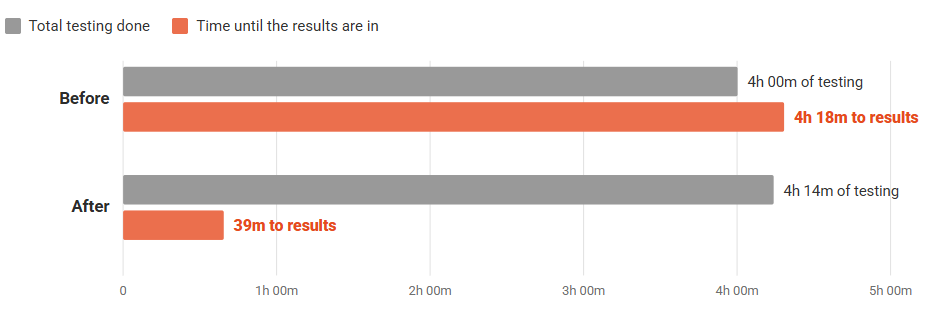
The project reminded me that you don't always need a new tool to fix a slow process. A bit of measuring, some careful tagging, and a small script got me most of the way there.
